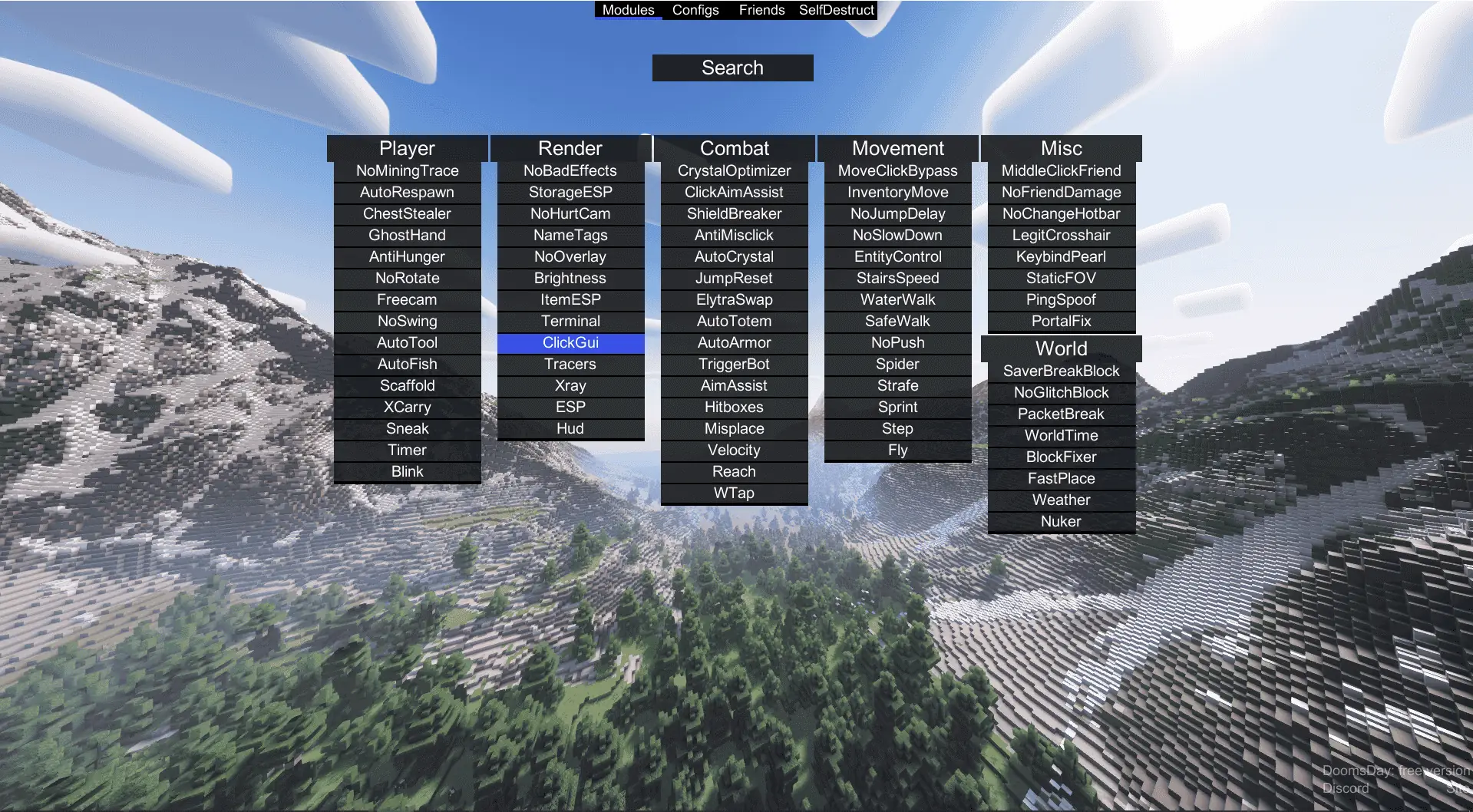
DoomsDay Module List – All 77 Modules
Complete documentation of every module in the DoomsDay GUI, grouped by category. The names, settings, ranges and defaults below mirror the in-game interface exactly – nothing here is invented.
Player (12) · Render (11) · Combat (18) · Movement (14) · Misc (11) · World (11)
Not installed yet? Follow the installation guide, check version support, or see the live GUI on the features page. Questions about a specific module? Ask in our Discord.
Player (12 modules)
Every module here can be expanded in the GUI and bound to its own key.
AntiHunger
Reduces hunger depletion while moving.
Toggles: Sprint, On ground
AutoTool
Selects the best tool for the block you are breaking.
Prefer: None / Silk touch / Fortune · Toggles: Auto weapon, Anti break, Switch-back
AutoArmor
Equips the best available armor from your inventory.
Delay 50–180 (default 75) · Durability 0.0–50.0 (default 15.0) · Priority: Protection / Fire / Blast / Projectile · Toggles: Ignore elytra, Anti break
Blink
Delays your movement updates until toggled off.
ChestStealer
Quickly moves items out of containers.
Open delay 0–500 (default 100) · Close delay 0–500 (default 200) · Delay range 40–300 (default 100–200) · Toggles: Auto close, Important first
Freecam
Lets the camera leave your body to look around freely.
HSpeed 0.25–2 (default 2) · VSpeed 0.25–2 (default 2) · Toggles: Rotation, Arrow move, Cancel move, Cancel interact, Disable on damage, Disable on death
GhostHand
Allows interacting with blocks through walls.
KeybindPearl
Throws ender pearls from a keybind.
Toggles: Instant
NoPush
Ignores pushes from entities and fluids.
Toggles: Entity, Liquid, Blocks
NoRotate
Controls how server-side rotations are applied.
NoSwing
Hides the arm-swing animation.
Toggles: Server, Client
WaterWalk
Lets you walk across water surfaces.
Offset 0.001–0.5 (default 0.001) · Method: Solid / Jump / BigJump / Matrix / MatrixSpeed · Toggles: Half water block
Render (11 modules)
Every module here can be expanded in the GUI and bound to its own key.
Hud
Configurable on-screen HUD elements.
Scale 0.5–1.0 (default 1.0) · Shadow darkness 0–1.0 (default 0.500) · Toggles: Client name
Brightness
Configurable module in the DoomsDay GUI.
ESP
Highlights entities through walls.
Contour width 0.5–3 (default 2) · Fade distance 0–15 (default 0) · Max distance 10–300 (default 250) · Mode: Box / Shader 1 / Shader 2 · Toggles: Players, Friends, Monsters
ItemESP
Highlights dropped items through walls.
Fade distance 0–15 (default 0.0) · Mode: Box / Shader · Toggles: Tracers
NameTags
Customizable name tags above players.
TextScale 0.5–3 (default 0.5) · ItemScale 0.5–3 (default 0.5) · EffectsScale 0.5–2 (default 0.5) · Name: Format / Raw · Render: 2D / 3D · Toggles: Items, Enchants, Effects, Health, Ping, Gamemode
NoHurtCam
Disables the camera shake when taking damage.
NoOverlay
Hides selected screen overlays.
Toggles: Pumpkin, Scoreboard, Boss, Fire, Water, Inside block
StaticFOV
Locks the FOV so speed changes do not alter it.
FOV 10–170 (default 120)
StorageESP
Highlights containers through walls.
Max distance 10–300 (default 250) · Fade distance 0–15 (default 0) · Mode: Box / Shader · Pos: Bottom / Middle / Top · Toggles: Chest, Ender chest, Shulker, Hopper, Tracers
Tracers
Draws lines to nearby entities through walls.
Max distance 10–300 (default 250) · Toggles: Players, Friends, Monsters, Distance color, Stem
Xray
Makes selected blocks transparent to reveal ores and caves.
Exposed depth 0–10 (default 0)
Combat (18 modules)
Every module here can be expanded in the GUI and bound to its own key.
AimAssist
Assists with aiming at nearby targets.
Speed 1–8 (default 2) · Sensitivity 1–8 (default 8) · Prediction 0–3 (default 0) · Distance 2.9–16 (default 5) · Fov 0–360 (default 90) · Aim mode: Wind / Simple · Aim Position: Center / Random · Priority: Distance / Mouse · Toggles: Players, Mobs, Mouse block, Vertical aim
AntiMisclick
Filters out accidental inventory clicks.
Chance 0–100 (default 100) · Toggles: Sword or axe
AutoClicker
Automates left/right clicks at a configurable rate.
Hits mode: Always / Only crits / Prioritize crits · Mode: Cooldown / CPS / Server cooldown · Toggles: Allow break, When eating, Sword or axe
AutoCrystal
Automates end-crystal placement and attacks.
Players range 3–11 (default 5) · Place delay 0–10 (default 5) · Break delay 0–10 (default 4) · Toggles: Attack block, When jumping
AutoTotem
Refills totems from your inventory automatically.
Delay 50–300 (default 80) · Fill slots count 1–8 (default 1) · Mode: Always / Manual / Smart · Toggles: Ignore enchanted, Use swap hotbar, Auto fill hotbar
ClickAimAssist
Applies aim assistance on clicks.
Speed 1–8 (default 2) · Sensitivity 1–8 (default 8) · Prediction 0–3 (default 0) · Distance 2.9–16 (default 5) · Fov 0–360 (default 90) · Delay range 40–300 (default 100–200) · Aim when: Press / Click · Click mode: Cooldown / CPS / Delay / Server cooldown · Hits mode: Always / Only crits / Prioritize crits · Aim mode: Wind / Simple · Aim Position: Center / Random · Priority: Distance / Mouse · Toggles: Players, Mobs, Mouse block, Vertical aim
CobWebPlacer
Places cobwebs at a chosen position.
CystalOptimizer
Performance options for crystal combat.
Delay 0–3 (default 0) · Toggles: Fast place
ElytraSwap
Automates chestplate and elytra swapping.
Hitboxes
Displays entity hitboxes, optionally enlarged.
Width 100–600 (default 100) · Height 100–200 (default 100) · Distance 0–8 (default 0) · Backtrack ticks 1–20 (default 3) · Toggles: Invisible HB, Players, StaticHeight, Mobs, Animals, Sword or axe
JumpReset
Jumps automatically when hit to reset knockback.
Chance 0–100 (default 50) · Toggles: Explosions
Misplace
Position offset controls with per-axis values.
Approach distance 0.1–2 (default 1) · Max range 4–16 (default 8)
Reach
Extends your interaction range.
Reach 3–8 (default 3) · Entities 2–7 (default 2) · Toggles: Only when sprinting
ShieldBreaker
Targets shields in combat.
Shield ticks 0–8 (default 0) · Swap delay 0–400 (default 50) · Spam delay 0–600 (default 100) · Toggles: Axe spam
Teams
Controls how scoreboard teams affect targeting.
Hit mode: MC teams / Team color / Colors / Name color / First color
TriggerBot
Attacks automatically when the crosshair is on a target.
Reach 2–8 (default 3.5) · Miss chance 0–100 (default 0.0) · Delay range 40–300 (default 100–200) · Hit mode: Always / Only crits / Prioritize crits / Crists+sprint · Click mode: Cooldown / CPS / Delay / Server cooldown · Toggles: Players, Mobs, Animals, Crystal, When eating, Simulate clicks
Velocity
Modifies the knockback you take.
Horizontal 0–200 (default 100) · Vertical 0–200 (default 100)
Wtap
Automates W-tapping during combat.
Chance 0–100 (default 50) · Distance 1–6 (default 6) · Start tap delay 0–300 (default 300) · Tap delay 30–300 (default 300) · Delay range 1–6 (default 2–5) · Toggles: Only sword, Only on ground
Movement (14 modules)
Every module here can be expanded in the GUI and bound to its own key.
EntityControl
Controls how ridden entities behave.
Fly
Adds a configurable flight mode.
Speed 0.25–10 (default 2)
InventoryMove
Lets you keep moving while inventory screens are open.
Toggles: Sneak, Chat, Sign
NoFall
Prevents fall damage.
NoJumpDelay
Removes the vanilla delay between jumps.
NoSlownDown
Ignores movement slowdowns such as sneaking or soul sand.
Cobweb VSpeed 0–1 (default 0) · Cobweb HSpeed 0–1 (default 0) · Toggles: Soul sand, Ice, Slime, Bow, Eat, Drink
SafeWalk
Prevents walking off edges.
Max height 0.125–3 (default 2) · Distance 0–0.3 (default 0) · Toggles: Sneak, Safe jump
Scaffold
Places blocks beneath you as you move.
Distance 0–5 (default 0) · Delay 40–150 (default 40) · Method: NPC / AACJump / AAC / SpartanJump / Spartan / Matrix · Toggles: Spoof Hotbar, Auto Hotbar, Safe walk, Sneak down, Jump tower, Jump horizontal
Sneak
Automates sneaking with configurable conditions.
Spider
Lets you climb walls like a spider.
Method: Climb / Jump / Step / SpartanStep / Matrix
Sprint
Keeps you sprinting, with per-situation toggles.
Toggles: Whean eating, Back, Left right, Direction jump, Keep sprint
StairsSpeed
Modifies movement speed on stairs and slabs.
Speed 0.3–0.5 (default 0.5) · Ticks 0–30 (default 0) · RecoveryTicks 0–6 (default 0)
Step
Raises your step height to skip blocks.
PredictTicks 0–10 (default 2) · Delay 0–50 (default 50) · Height 0.6–3 (default 1.25) · BoostDist 0–0.15 (default 0) · Method: Vanilla / NPC / Matrix · Toggles: CustomPackets, PostSend, OnlyOnGround
Strafe
Restores air-strafing control.
Misc (11 modules)
Every module here can be expanded in the GUI and bound to its own key.
AutoRespawn
Respawns instantly after death.
Toggles: Istant
LegitCrosshair
Tweaks the vanilla crosshair.
MiddleClickFriend
Adds players to your friends list with middle-click.
MoveClipBypass
Adjusts how movement clipping is handled.
Mode: NPC / Legit
NoBadEffects
Removes or hides negative potion effects.
Toggles: Nausea, Blind, Wither, Darkness, Remove effects
NoChangeHotbar
Prevents hotbar slot changes.
NoFriendDamage
Prevents damaging players on your friends list.
NoEntityInteract
Blocks interaction with selected entity types.
Toggles: Ignore sword, Ignore axe
PingSpoof
Reports an adjustable ping range.
Delay range 10–500 (default 75–225)
XCarry
Keeps items in the crafting grid when you close it.
Terminal
Built-in in-game command terminal (opens with ~).
World (11 modules)
Every module here can be expanded in the GUI and bound to its own key.
AutoFish
Handles casting and reeling automatically.
Catch delay 0–40 (default 6) · throw delay 0–60 (default 20) · Toggles: Anti break, Cactus, Fire, Web, Top side
ClientSpoofer
Chooses the client brand your game reports to servers.
Brand: Vanilla / Forge / Fabric / Feather / Lunar
FastPlace
Speeds up block placement.
Delay range 0–4 (default 1–3) · Toggles: Blocks, Items
Nuker
Breaks multiple nearby blocks automatically.
Reach 2–6 (default 5) · Break delay 0–5 (default 3) · Break mode: Only visible / Break interfering blocks / Break through blocks · Aim: Instant / Wind · Toggles: Keep standing block
NoGlitchBlock
Reduces ghost blocks when placing or breaking.
Toggles: Place, Break
PacketBreak
Sends block-break packets directly.
PortalFix
Reduces portal-related glitches.
Toggles: Gui, Transparent
SaverBreakBlock
Breaks blocks with additional safety checks.
Timer
Changes the game tick speed.
Speed 0.05–5 (default 1)
Weather
Controls the displayed local weather.
Mode: Sun / Rain / Thunder
WorldTime
Changes the displayed world time.
Time 0–24000 (default 19000) · Mode: Full / Unhook+hide / Unhook